

You’re busy running your business. You shouldn’t have to worry about constantly creating new content for every social platform. We get it. That’s why we’re thrilled to introduce the Blog-to-Social Post Generator in your Marketing 360® Blogs Collection.
This new, simple feature lets you repurpose your blog content into engaging social posts in just a few clicks. Now, you can grow your online presence, stay active on social media, and get more out of every blog post you write!
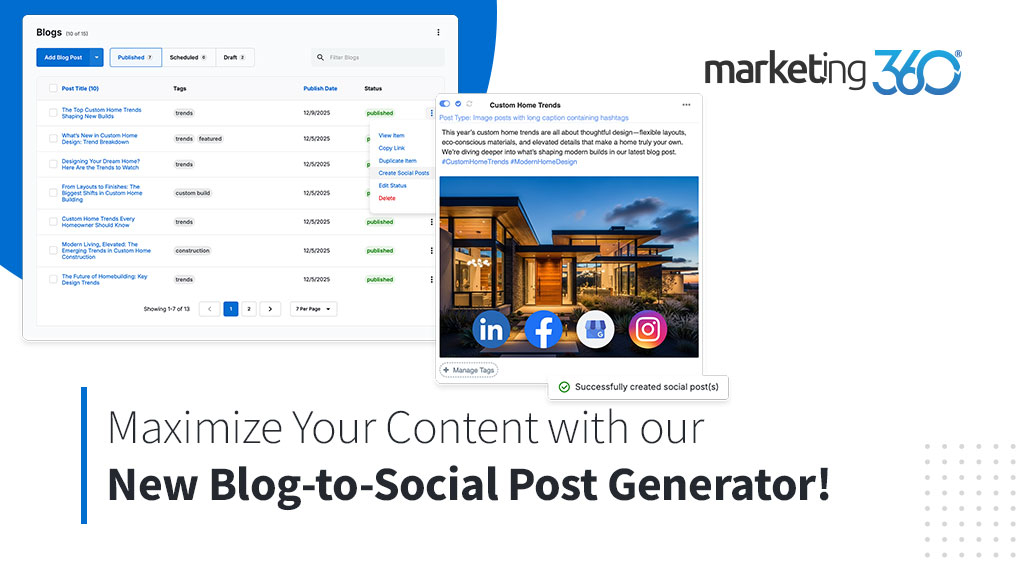
Maximize your content, effortlessly
Your blogs are high-quality, valuable content. Why let them sit on one page? With the Blog-to-Social Post Generator, you can quickly turn one piece of content into multiple ways to share. This helps you save time and work smarter, not harder, to fill your social calendar.
Here’s how the generator helps your small business:
Boost Content ROI: Every blog post you create takes time and effort. This feature helps you reach a wider audience by automatically turning that content into eye-catching social media posts.
Keep Feeds Full: Populating your social feeds is simple. You can create up to four posts per blog, ensuring you always have engaging content ready to go.
Grow Your Social Presence: Consistent sharing of high-quality content is key to social growth. The generator helps you easily maintain that consistency and craft captions that command attention and likes.
Save Time: Automate the tedious process of writing, editing, and formatting new social captions from scratch, freeing up your time to focus on your customers.
How to get started
Visit your Blogs Collection in the Marketing 360® Platform.
Click the overflow menu next to any Published or Scheduled blog.
Click “Create Social Posts” and choose how many posts you want (up to 4).
Once generated, your new posts are saved to your Social App Content Library where you can review and publish them in a few simple steps.
Ready to simplify your social media marketing? Log in to your Marketing 360® Platform today or learn more about our plans and pricing.